Automating orders from e-mail into your system
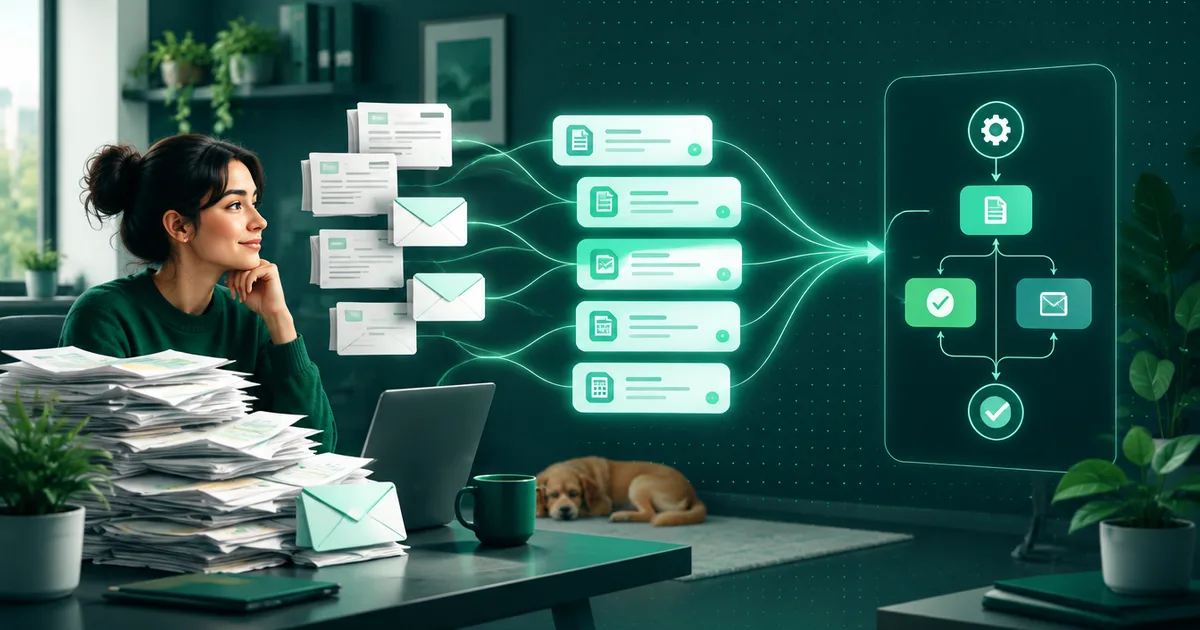
The agent reads the e-mail, recognises the items, quantities and address, checks them against stock and the price list and creates the order in the system. Exceptions go to a person, not to an error log.

The agent reads the order e-mail, recognises the items, quantities, delivery address and other required details, checks them against stock and the price list and creates the order directly in your system — ERP, online shop or CRM. When it is not sure, it does not create the order on its own — it sends it to a person for review. Text recognition is handled by a large language model (LLM), not a fixed template, so it can cope even with an e-mail written in free words, not just a filled-in form.
What does the flow look like step by step?
- The e-mail arrives at a designated address (for example orders@yourcompany.sk) or is fetched from an existing mailbox you already use.
- The agent reads the text and attachments — the order can be written directly in the body of the e-mail or attached as a PDF or image. It can also handle an e-mail where the order is described in free text between the greeting and the signature, not just a filled-in table.
- It recognises the items, quantities and address. For products it relies on codes or names from your price list, not on guesswork — when a customer writes an abbreviated or commonly used name instead of the official one, the agent matches it to an item in the price list based on what it already knows.
- It checks availability and price against stock and the price list. When an item does not match or is out of stock, it becomes an exception instead of being quietly approved.
- It creates the order in the system with all the fields someone would otherwise retype by hand — customer, items, quantities, address, requested date.
- It sends the customer a confirmation that the order has been received and is being processed — the same confirmation a person would send, just without waiting for someone to get to the e-mail.
- It logs what it did and with what data, so that it can be traced back why the order was created exactly this way. Without this record, in a complaint or an audit it is impossible to prove where a specific detail came from.
The exact order and how many steps can be automated depend on which systems you use today and whether they have an interface for integration — this is established in the analysis before the pilot, not estimated in advance.
Which systems can be connected?
The target system where the order is created is usually an ERP, an e-commerce platform or a CRM — that is, the place where someone would create the order by hand anyway. The connection goes through the interface (API) the system offers; when there is no interface, another route is found, such as a file import, and that extends both the time and the cost of deployment. That is why the availability of an interface is checked right at the start of the analysis, not halfway through development.
The source of the order does not have to be just an e-mail inbox. The same recognition principle works for an order attached as a PDF to an e-mail, sent through a contact form on the website or received as a message in a support tool — only the input changes, the flow behind it is the same.
What happens with an exception?
An exception is not an error; it is a normal part of the flow. The agent sends the e-mail to a person for review when:
- it cannot match a product in the e-mail to any item in the price list with sufficient certainty,
- the quantity exceeds the normal range for that customer or product,
- an item is out of stock and a decision is needed on a replacement or a date,
- the address or billing details are missing or contradict each other,
- the customer is new and has no record in the system,
- the order contains an unusual combination of items that has not appeared for that customer before.
In all these cases the agent prepares the material — what it read from the e-mail and where it is unsure — and leaves the decision to a person. That is the human-in-the-loop principle: when there is uncertainty, no order is created blindly.
Exceptions do not become a permanent state over time. When the same type of exception keeps recurring — for example, the same customer always writes orders in a different format — a rule can be added so that next time it goes through without intervention. The list of exceptions is therefore also a list of what the agent should learn to recognise on its own in the next round.
How do you check that it works correctly?
Before full deployment, the agent runs on one process as a pilot with measurement. What is tracked is how many orders went through without human intervention, how many became exceptions and why, and whether the number of exceptions falls as the agent is trained. Without this measurement automation is a toy, not a system that can go live. The same measurement principle applies across all AI use cases, not just orders.
Measurement does not end with the launch of the pilot. Even after going live it is worth regularly checking whether the share of exceptions is falling or, on the contrary, rising — for example because a new supplier or order type has appeared that the agent has not yet encountered. Without this view, automation quietly gets worse over time and nobody notices until the exceptions pile up in one surprised queue.
What does it cost and how long does it take?
Automated order and enquiry processing costs from €1,490 excl. VAT and takes 1 to 4 weeks — depending on how many systems the agent needs to be connected to and how many types of exceptions the process has. Before that, we recommend a process analysis from €490, where we work out exactly how many orders a month arrive by e-mail, how many of them have a regular form and when the deployment will pay off.
If you are dealing with invoice processing rather than orders, the principle of recognition and checking is similar — the difference is in what is extracted from the document. The difference between simpler automation and an agent that makes decisions is covered in the article AI automation vs. RPA.
What about the customer’s data in the e-mail?
An order e-mail usually contains a name, an address and sometimes other personal data. The same rules apply to it as to any other AI tool in the company — who has access to the mailbox, where the data is stored and under what contract the processor sees it. We cover this topic in more detail in the article AI in your company, safely.