How automated invoice processing works
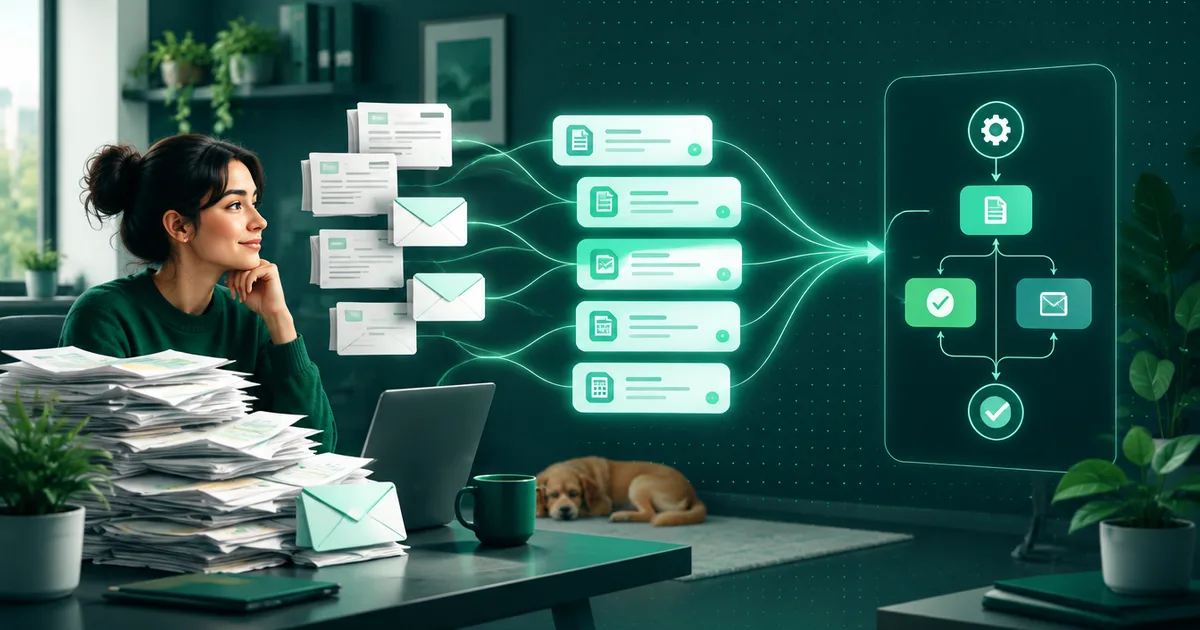
OCR reads the text of the invoice and a language model extracts the amount, supplier and line items from it. A person reviews the exceptions, and only then is the entry saved.

Automated invoice processing has four steps: the document is read (OCR), specific data is extracted from the text that was read (a language model), it is validated against rules and existing data, and only after the check is the entry saved to the accounting or ERP system. The machine prepares the record; the final decision on exceptions is left to a person.
What exactly does OCR do?
OCR (optical character recognition) takes a scan or PDF of the invoice — an image, not structured data — and turns it into text. It can also recognise where on the page the text sits: in which table, in which column, next to which heading. Without this step you would only have an image of the invoice, which a computer cannot do anything with.
The problem is that every supplier sends invoices in a different format. One has the amount at the top right, another at the bottom, a third sends the invoice as text directly in the body of the e-mail. OCR on its own reads the text correctly, but it does not know which number is the total including VAT and which is just the subtotal of one line item.
What does a language model add?
This is where the LLM comes in. It receives the text that was read, together with information about where on the page each piece of text was, and extracts specific fields from it: supplier, company ID (IČO), variable symbol, due date, amount with and without VAT, individual line items. Unlike a fixed template parser, it can cope even with an invoice in a format it has not seen before — it does not look for text at an exact coordinate but by meaning.
That still does not mean one hundred per cent certainty. That is why it makes sense for the model to step back from a suspicious result rather than quietly enter it — which is what the next step is about.
What does the check before entry look like?
Before the record is saved to the system, it is validated:
- Do the numbers add up? The sum of the line items matches the amount on the invoice, the VAT matches the rate.
- Does the system know the supplier? A new company ID or a new bank account for an existing supplier is a reason for review, not for automatic entry.
- Does it match the order? If the invoice follows an order, the amount and line items should match what was ordered.
- Is the amount in the normal range? An invoice an order of magnitude higher than usual for that supplier goes for review before it is posted.
When an invoice passes all the checks, the entry is prepared for approval or saved directly, depending on how the process is set up in your company. When it does not pass, it goes to a person along with an explanation of exactly what does not match.
Where does a person stay in the process?
This is human-in-the-loop: the machine takes over the repetitive part — reading, extracting data, comparing — and a person decides on exceptions and approves the payment. In the first deployment it is common to also have some of the invoices that passed automatically reviewed, until it is verified that the system behaves reliably with specific suppliers.
Where is the data written?
The verified record is written to the accounting or ERP system through its interface — an API, or an integration tool such as n8n when the system has a limited API or none of its own. The differences between such tools and when to use which are covered in the article n8n, Make or Zapier: what to choose for automation. Extracting the data from the invoice itself is handled by a different step of the pipeline (OCR and LLM above); a tool like n8n is used only to connect to the target system.
What does e-invoicing have to do with it?
According to the Finančná správa SR (the Slovak Financial Administration), voluntary implementation of eFaktúra (e-invoicing) is available from the second quarter of 2026, and from 1 January 2027 receiving electronic invoices will be mandatory for all legal entities and businesses that are taxable persons. An electronic invoice already arrives as structured data, not as an image — the OCR step is no longer needed for it, while the check and the entry into the system stay the same. Until eFaktúra is fully widespread, most documents arrive as PDFs or scans, and there both the OCR and the LLM steps remain necessary.
Why it is not just “upload a PDF and done”
The difference between a demo that works on ten neat invoices and a system that handles hundreds of invoices a month from dozens of different suppliers lies precisely in the validation and in how exactly it is set up what goes to a person and what does not. Without this step the system either enters an error or sends too many invoices to a person and the automation does not pay off. How to work out when such a solution pays for itself is described in the article How much an AI agent costs in a company, and when it pays off.
Invoice and document processing with us costs from €990 and takes 1 to 4 weeks, including integration with your accounting system.